How to change globe at home wifi password?

You can change your Globe at Home WiFi password using a phone, laptop, or PC in a few easy steps. The method is simple: just visit the URL 192.168.254.254 while connected to your Globe at Home WiFi and carefully follow the steps mentioned below for further information.

You will learn to reset your password. If you have forgotten the password, you can change it yourself. You just need to follow these steps on your WiFi router. The solution to the problem is mentioned below.

Using Mobile or PC

You can avail Globe at Home Prepaid/Postpaid WiFi rewards points if you purchase it via GCash or the GlobeOne App. However, before availing of this, make sure that you have successfully completed the Globe SIM registration process. To change the password, you need to do the following:-
  • Step 1: Connect your phone or PC to the Globe at Home WiFi network whose username and password you want to change.
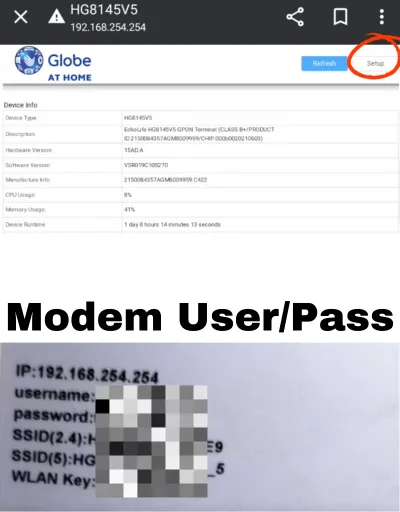
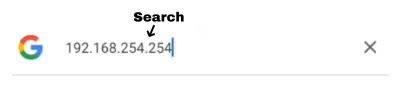
  • Step 2: Open your favorite browser (Chrome, Safari, or Mozilla) and go to the URL 192.168.254.254. This will take you to your Globe at Home WiFi portal services page.
Search for 192.168.254.254 (url)
  • Step 3: Click on the ‘Setup’ button. Before logging in to the portal.
modem username and password setup
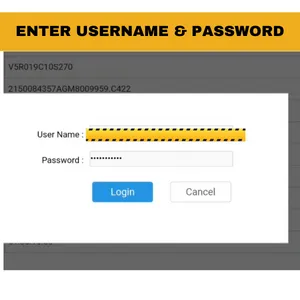
  • Step 4: Enter the username and password from the back of the modem into the login section and click the ‘Login’ button.
login via username and password
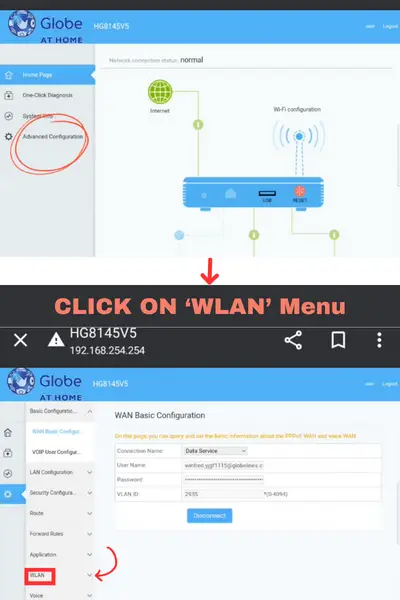
  • Step 5: In the next section, click on the ‘Advanced Configuration’ option on the left side.
  • Step 6: Click on the ‘WLAN’ menu to access the page for password settings.
CLICK ON 'WLAN' Menu
  • Step 7: Click on the ‘Basic Network’ option.
  • Step 8: Here, you can set the username by editing the SSID Name (1-32 characters).
  • Step 9: To change your password, find the ‘WPA PreSharedKey’ field. Uncheck the ‘Hide’ box to see the current password and remember it for future reference. Enter your new password.
  • Step 10: After typing your new password, click on the ‘Apply’ button below.

This will successfully change the username and password of your Globe at Home WiFi.
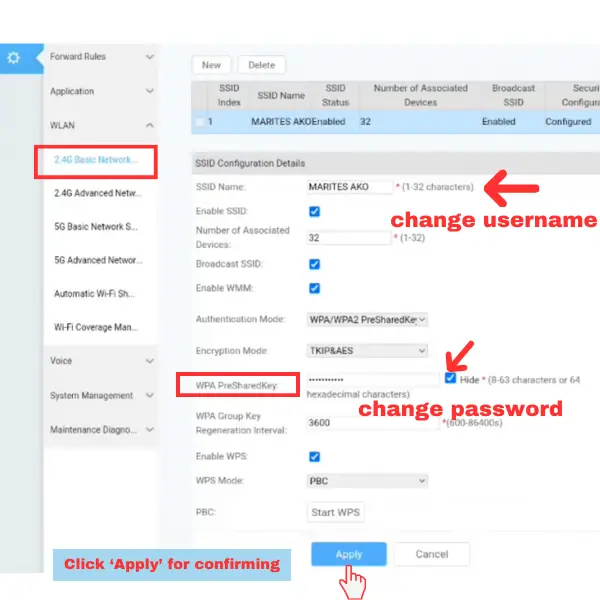
change globe at home wifi username and password

How to reset Globe At Home Prepaid WiFi? If you forgot Password

If you have forgotten your Globe at Home WiFi password and the router’s password, you can reset it by following these instructions:

  1. Check the back of your modem.
  2. You will find a ‘Reset’ button near the plugged-in cable.
  3. Press this ‘Reset’ button using a pin for 2 seconds until the indicator lights start blinking and then go out.
  4. Follow the above instructions for resetting your Globe at Home WiFi password.

You can follow these guidelines if you are a Globe or registered TM SIM user.

Similar Posts

  • Globe SIM Replacement

    In case of a defective or damaged SIM, or if you need to upgrade or replace a lost/stolen SIM, you can request a Globe SIM Replacement in the easiest way possible. Bring the required documents (listed below) based on your situation, visit the nearest Globe Store, and apply for a new SIM. Steps for Globe…

  • Fix Globe and TM Registration Errors (Selfie Problem, Registration Failed)

    During the registration of a Globe or TM SIM, you may encounter errors such as ‘registration failed’ or ‘upload picture less than 2 MB.’ These can be easily resolved. Make sure you input all the required information correctly. To resolve the picture error, first, capture the image with your camera, then take a screenshot of…

  • GO 99 Plus

    GOPLUS99, also known as Go99 or Go+99, provides 8 GB of 5G data along with text messaging for only ₱99, valid for 7 days. Users also gain access to GoSHARE, GoWATCH, and GoPLAY. How to Claim Go Plus 99? If you have the GlobeOne app, you can claim it from there. Go to the Promos…

  • Globe 5G Compatible Phones (Updated List) 2026

    Globe Telecom offers 5G-enabled connectivity for various smartphones and smartwatches if you live in a 5G-enabled area in the Philippines. You can enjoy glitch-free and faster internet speeds with all compatible devices. Smartphones or smartwatches that support the 3500 MHz band are compatible with Globe’s 5G signals. You can check your phone’s network settings to…

  • New GlobeOne App Download 2026 [Android & iPhone]

    If you’re living in the Philippines, you already know the GlobeOne app is a digital companion for managing all your Globe/TM Prepaid, Postpaid, Broadband, Wi-Fi, and GFiber Prepaid accounts. However, the problem arises when it comes to mind what are the actual sources where we can download authentic applications for Android and iOS. GlobeOne app…

Leave a Reply

Your email address will not be published. Required fields are marked *