How to Share (Passaload) a Load In Globe using *143#

You can share (Passaload) a load on Globe by using *143# or via text message. You can share load, promos, and data with anyone you want. Follow the step-by-step guidelines to share load quickly and safely

By Dialing *143# Code

Please ensure you have successfully completed the process of Globe SIM registration.

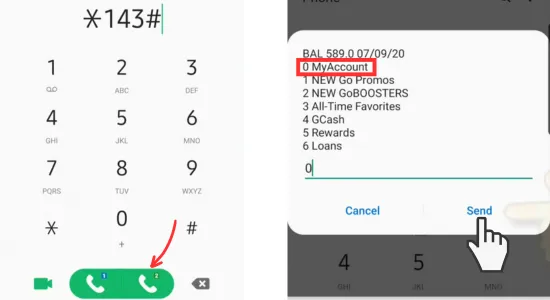
  • In the first step, open your phone’s dialer.
  • Enter the *143# code and hit the call button.
  • On the next screen, enter ‘0’ to select the ‘My Account’ option.
  • Hit the ‘Send’ button to proceed.
share a load using *143# step-1
  • Enter ‘3’ to select the ‘Share-A-Load/Promo/MB’ option.
  • In the next step, choose the service you want to use.
    • To share load/promo without a PIN, select option 1.
    • To share load/promo with a PIN, select option 2.
    • To share a promo without a PIN, select option 3.
    • To share a promo with a PIN, select option 4.
    • To share MBs as GS Share, select option 5.
    • To change your share PIN, select option 6.
  • If you want to share load without a PIN, enter ‘1’.
  • Click the ‘Send’ button to proceed to the next step.
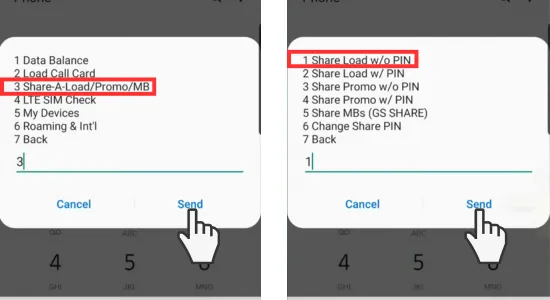
share a load using *143# step-2
  • Enter the amount of load you want to share.
  • Hit the ‘Send’ button to move to the final step.
  • In the last step, enter the receiver’s 10-digit number and hit the ‘Send’ button.
  • You will receive a confirmation text message from Globe Telecom indicating that you have successfully shared (passloaded) a load with another user.
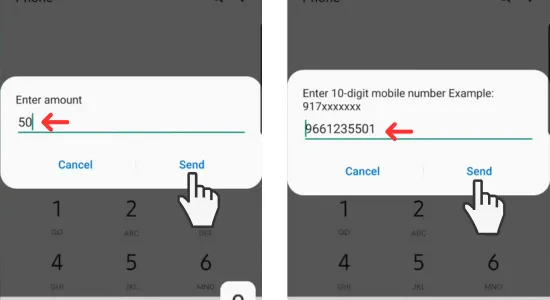
share a load using *143# step-3

By Sending Text

  • Open the Messages app on your Android or iPhone.
  • Create a new message conversation to share load with your friend or family member.
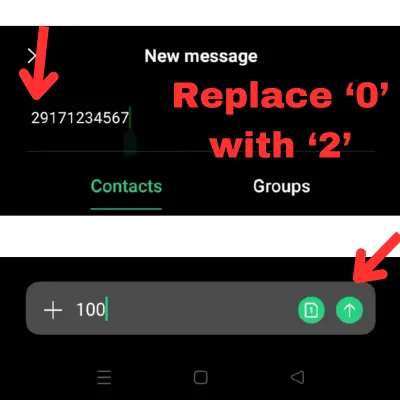
  • Enter the recipient’s number, replacing the first digit “0” with “2”.
  • Type the amount of load you want to share. For example, to send 100 PHP, type “100” and hit the send button.
  • You will receive a confirmation message to confirm the load sharing.
  • Reply “YES” to this message to confirm.
  • Congratulations, you’ve successfully shared load with your friend or family member!
share a load via text

You can also follow these guidelines to use the services provided by Globe Telecom.

  1. 0904-0905-0906-0915-0916-0917-0926-0927-what-network.
  2. Call Landline using Globe.
  3. Redeem Points in Globe

Similar Posts

  • Updated List of Globe Stores (2026)

    Globe has recently updated its list of stores and opened new locations in the Philippines as of March 13, 2026, particularly in areas with high demand. Find the nearest Globe Store and get assistance from official staff for any queries related to Globe Telecom services. Globe Telecom provides services such as Globe SIM Registration and…

  • Globe Roaming International Rates and Activation Process Guide

    Are you planning a long trip to visit multiple countries but worried about buying a local SIM card to receive text messages or phone calls from your family, friends and loved ones.? Globe roaming services have solved your problem and provide you with a smooth connection to your loved ones through text messages, calls, or…

  • Online Globe Payment Through Center and Channels [GlobeOne & GCash]

    Globe Telecom provides you with three channels for Globe payments: online, GlobeOne App, and GCash app methods. All these methods offer you an easy way to pay your bills for retail items, promo subscriptions, online registrations, and other Globe products and services. Follow the steps mentioned below to pay your bills in the easiest way…

Leave a Reply

Your email address will not be published. Required fields are marked *